
Embroidery Machine, Supplies
Best Embroidery Machines for Beginners (2026 Guide)

Aug
Welcome back, embroiderers! Buying your first embroidery machine is exciting, but with so many models it’s easy to feel lost. In this guide I compare the best embroidery machines for beginners: what each one does well, how big a design it can stitch, whether it also sews, and which one fits your projects and budget. All of them are current models you can buy today. I’ll also tell you what else you need to start and which designs to stitch first.
Best Embroidery Machines for Beginners: Quick Comparison
| Machine | Max. embroidery area | Also sews? | WiFi | Best for |
|---|---|---|---|---|
| Brother PE545 | 4″ × 4″ | No | Yes | Easiest, most affordable start |
| Brother SE700 | 4″ × 4″ | Yes | Yes | Sewing + embroidery on a budget |
| Brother PE900 | 5″ × 7″ | No | Yes | Most of our designs at full size |
| Brother SE2000 | 5″ × 7″ | Yes | Yes | One machine for everything |
| Janome Memory Craft 400E | 7.9″ × 7.9″ | No | No (USB) | Large square designs, quilt blocks |
| Janome Memory Craft 500E | 7.9″ × 11″ | No | No (USB) | The largest designs, room to grow |
Specifications as published by the manufacturers. Prices are approximate and change often, so check the current price before buying.
How to Choose Your First Embroidery Machine
Before looking at models, answer these questions. They’ll narrow your options fast:
- Do you also want to sew? A combo machine (sewing + embroidery) saves space and money. An embroidery-only machine is simpler and usually offers a bigger hoop for the price.
- How big will your designs be? A 4″ × 4″ hoop is fine for baby items, pockets, caps and small monograms. For t-shirt fronts, towels and tote bags, a 5″ × 7″ hoop gives you much more freedom.
- What’s your total budget? Remember it’s never only the machine: you’ll also need stabilizers, thread, needles and designs.
- Is it a hobby or a business? For a small home business, a bigger hoop and faster workflow pay off. Read how to start an embroidery business if you’re planning to sell.
- Which file format does it read? Brother machines use PES files and Janome machines use JEF files. Our designs include both, plus all other major formats.
Types of Embroidery Machines
- Combo sewing and embroidery machines: one machine for both. Great for beginners who sew too.
- Single-needle embroidery-only machines: the most common first machine. You change thread colors by hand.
- Multi-needle (semi-industrial) machines: change colors automatically and embroider caps and finished garments more easily. A step up for growing businesses.
- Industrial and multi-head machines: built to stitch many hours a day for large orders. Expensive and space-hungry, not for beginners.
Every model in this guide is a home (domestic) machine: easy to learn, affordable and perfect to start.
The Best Embroidery Machines for Beginners

1. Brother PE545
- Embroidery area: 4″ × 4″
- Sews too: no (embroidery only)
- Connectivity: WiFi + color touchscreen
- Format: PES
- Approx. price: $430–500
The easiest and most affordable way to start embroidering. It replaces the popular PE535 and adds WiFi, so you can send designs from your computer without a USB stick. Perfect for names, small logos, patches and baby items.
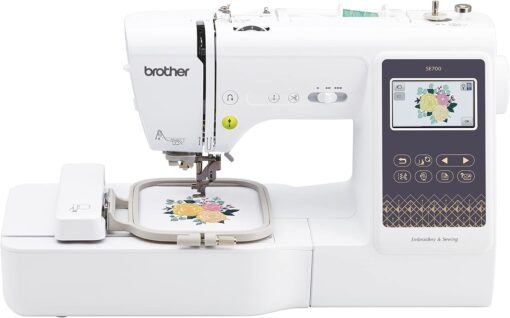
2. Brother SE700
- Embroidery area: 4″ × 4″
- Sews too: yes
- Connectivity: WiFi
- Built-in designs: 135
- Format: PES
- Approx. price: around $500
An affordable sewing and embroidery machine, and the successor of the classic SE600. Great for monograms, patches and small designs if you also want to sew.
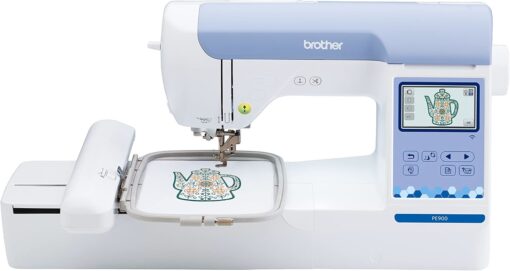
3. Brother PE900
- Embroidery area: 5″ × 7″
- Sews too: no (embroidery only)
- Connectivity: WiFi
- Format: PES
- Approx. price: around $1,180
The step up from the PE800. The larger 5″ × 7″ hoop stitches most of our designs at full size, on t-shirt fronts, towels and tote bags, and you can send designs over WiFi.
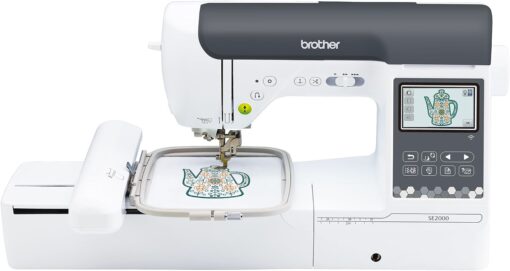
4. Brother SE2000
- Embroidery area: 5″ × 7″
- Sews too: yes
- Connectivity: WiFi
- Format: PES
- Approx. price: around $1,500
A top-rated combo that sews and embroiders with a 5″ × 7″ hoop and WiFi design transfer. One machine for everything if you have the budget.

5. Janome Memory Craft 400E
- Embroidery area: 7.9″ × 7.9″
- Sews too: no (embroidery only)
- Built-in designs: 160
- Format: JEF
- Approx. price: $1,500–2,000
A dedicated embroidery machine for beginners who want room to grow. The large square area is great for quilt blocks, pillows and jacket backs, and it’s built to last.

6. Janome Memory Craft 500E
- Embroidery area: 7.9″ × 11″
- Sews too: no (embroidery only)
- Built-in designs: 160
- Format: JEF
- Approx. price: around $2,100
The most complete option in this list, with a pro-level field and on-screen editing. A bigger investment for serious hobbyists and home businesses that you won’t outgrow quickly.
Growing into a business? A 15-needle machine like the Smartstitch S-1001 or Poolin EOM-15 switches colors on its own and embroiders caps and bulk orders. Expect around $4,000 or more. See multi-needle machines on Amazon.
As an Amazon Associate we earn from qualifying purchases.
What Else You Need to Start Embroidering
Check what’s included in the box: hoops, presser feet, spool caps, needles and sometimes software. Then add the basics:
- Embroidery thread: polyester or rayon embroidery thread in your favorite colors (regular sewing thread leaves lint and looks dull), plus bobbin thread.
- Stabilizers: tear-away for stable fabrics, cut-away for stretchy ones, and water-soluble as a topper for towels.
- Embroidery needles, small scissors and temporary spray adhesive.
- Extra hoops if your machine accepts more than one size.
- A USB stick to transfer your designs.
Here’s a complete checklist of must-have embroidery accessories.
Your First Embroidery Designs
Once your machine is ready, start with small, simple designs: hearts, stars, flowers and outlines with few color changes. They stitch fast and help you learn hooping and tension. Read our guide to embroidery designs for beginners for easy first projects.
All our designs include PES, JEF, DST, EXP, HUS, VP3 and more in several sizes, so they work with every machine in this list. Good places to start: free designs to practice, designs under $1, and themed bundles.
Tips for Buying a Used Embroidery Machine
- Test it before paying: ask the seller to stitch a design in front of you.
- Avoid very old models without manufacturer support or spare parts.
- Check what’s included: hoops, embroidery unit, cables and manual.
- If it needs a repair, get a technical diagnosis first and factor that cost into the price.
- Ask friends who embroider, watch video reviews of the exact model and read both good and bad reviews.
Whatever you choose, keep it in shape with simple embroidery machine maintenance at home.
Got your machine? Start stitching today
Thousands of designs in every machine format, with instant download.
Embroidery Machines for Beginners FAQ
What is the best embroidery machine for a beginner?
If you only want to embroider, the Brother PE545 is the easiest and most affordable start, and the Brother PE900 gives you a bigger 5″ × 7″ hoop. If you also want to sew, the Brother SE700 is a budget combo and the SE2000 adds a 5″ × 7″ hoop.
Should I buy a sewing and embroidery combo or an embroidery-only machine?
A combo machine is great if you sew too and want to save space. An embroidery-only machine is simpler to use and usually offers a larger embroidery area for the same price.
What hoop size do I need?
A 4″ × 4″ hoop works for baby items, caps, pockets and small monograms. A 5″ × 7″ hoop or larger is better for t-shirt fronts, towels and tote bags.
What file format do these machines use?
Brother machines read PES files and Janome machines read JEF files. Our designs include both, along with DST, EXP, HUS, VP3 and other formats.
What do I need besides the machine?
Embroidery thread, bobbin thread, stabilizers, embroidery needles, small scissors, a USB stick and some designs to start.
Is it a good idea to buy a used embroidery machine?
It can save money if you test it first, avoid very old models without support, and check that all hoops and parts are included.
I hope this guide helps you choose the right machine for your creative journey. Which one are you thinking about? Tell me in the comments!
SEW you next time,
Mary